

The Best Bluetooth FM Transmitter for with No Static!
Did you know you can upgrade your older car sound system with a noise-free Gizmo Guy Gadget Bluetooth FM transmitter and get CD-quality music from your smartphone through your car original factory radio? Yes! No Factory Radio Replacement Needed. Simply Plug and Play with this Gizmo Guy Gadget aka the Best Bluetooth FM Transmitter for car radio.
What is a Noise-Free Bluetooth FM Transmitter?
The Best Bluetooth FM transmitter adapter is a device that bridges the gap between your smartphone and your older vehicle’s outdated sound system without Bluetooth.
Here’s how the best Bluetooth FM transmitter for car works:
- Bluetooth Connection: You pair your smartphone to the transmitter via Bluetooth.
- FM Signal: The transmitter converts the audio from your device into an FM radio signal.
- Radio Tuning: You tune your car’s radio to the frequency broadcast by the transmitter.
- Playback: The audio from your device is then played through your car’s speakers.
In essence, the Best Bluetooth FM transmitter allows you to enjoy modern music streaming, hands-free calls, and integrate GPS Navigation through the original radio of your older car.
Here’s a breakdown of the best car Bluetooth transmitter functionalities:
- Bluetooth Connection: It uses Bluetooth technology to wirelessly connect to your smartphone, MP3 player, or any other Bluetooth audio source.
- FM Signal Transmission: The transmitter converts the received audio signal from your device into an FM radio signal.
- Radio Frequency Broadcast: This FM signal is then broadcast on a specific FM radio frequency.
- Picking Up the Signal: Your car’s FM radio tuner can then be used to scan for and pick up this frequency, allowing you to play your music or audio wirelessly through your car speakers.
In essence, the best Bluetooth FM Transmitter without static functions as a wireless adapter, enabling you to enjoy Bluetooth audio streaming on an FM radio system.
Ground Loop Noise in Car Audio: The Culprit Behind the Static, Humming and Buzzing noises.
Ground loop noise, also known as alternator whine, is a common annoyance in car audio systems, especially when using aftermarket components like Bluetooth FM transmitters. It manifests as a low-pitched whining or buzzing sound that fluctuates with engine RPM. Here’s a breakdown of what causes it:
1. Mismatched Ground Paths:
- In a car’s electrical system, the chassis typically acts as the ground for all electronic components. Ideally, all grounds should connect to the chassis at a single point.
- When introducing aftermarket electronics like a Bluetooth FM transmitter, a separate ground wire might be used. If this ground wire connects to a different spot on the chassis (or even another metal component) compared to the radio ground, a slight voltage difference can arise.
- This voltage difference creates a tiny electrical loop.
2. Electromagnetic Interference:
- The car’s alternator generates electricity and can introduce electromagnetic interference into the electrical system.
- That tiny ground loop acts like an antenna, picking up this electromagnetic interference from the alternator.
3. Audible Static Noises:
- The picked-up electromagnetic interference gets converted into an audible signal by the car audio system, resulting in the characteristic whine or buzzing sound.
Factors Affecting Ground Loop Noise:
- Quality of Grounding: Poor grounding practices, like loose or rusty connections, can exacerbate the issue.
- Sensitivity of Equipment: More sensitive audio components might be more prone to picking up ground loop noise.
- Length of Ground Wires: Longer ground wires can act as better antennas for electromagnetic interference.
By understanding the root cause, you can address ground loop noise and achieve a cleaner audio experience with the best bluetooth fm transmitter.
Bluetooth Adapter for Fiber Optic Audio Systems.
Ground loop noise is actually less likely to be audible on a fiber optic audio system in a car for a key reason:
- Fiber optic cables transmit light signals instead of electrical signals.
In a traditional car audio system, the audio signal travels as an electrical current. This electrical current is susceptible to the electromagnetic interference caused by the ground loop, which then gets translated into audible noise.
- Fiber optic cables are immune to electromagnetic interference. Since light travels through the cable and isn’t influenced by electricity, the ground loop cannot introduce noise into the signal.
Therefore, ground loop noise shouldn’t be an issue if your car has a true fiber optic audio system.
However, it’s important to consider a few things:
- Most car audio systems, even those advertised with “optical outputs” likely use digital-to-analog converters (DACs). These DACs convert the digital signal back into an electrical signal before it reaches the speakers. If the grounding on the DAC isn’t proper, you might still experience ground loop noise.
- Bluetooth FM transmitters themselves don’t use fiber optics. They convert the Bluetooth signal into an electrical signal that’s then modulated onto an FM radio frequency. So, if you’re using a Bluetooth FM transmitter with a car stereo that has a fiber optic input, the part of the system susceptible to ground loop noise is still the connection between the transmitter and the car stereo (via the FM radio signal).
In conclusion, fiber optic cables themself eliminate ground loop noise from the equation. But depending on your specific car audio setup and how the Bluetooth FM transmitter integrates, ground loop noise might still be a possibility.
How do I reduce the noise on my Bluetooth FM transmitter?
Here are some strategies to reduce noise on your Bluetooth FM transmitter and achieve a clearer audio experience:
Optimizing the FM Frequency:
- Find a Clean Frequency: A crucial step is finding a clear FM radio frequency. Strong local radio stations can bleed over and create static. Use your car radio to scan for frequencies with minimal background noise.
- Consider Less Common Frequencies: While most FM radio stations operate between 88.1 MHz and 108.0 MHz, some radios can pick up stations below 88.1 MHz (international bands). If your radio allows, explore these lower frequencies for potentially less crowded airwaves.
Grounding (if applicable):
- Consult your manual: Some Bluetooth FM transmitters have a designated grounding wire. If yours does, properly grounding it to a bare metal point on your car’s chassis can significantly reduce noise. Refer to your transmitter’s manual for specific instructions.
Power Source:
- External Battery: Car chargers or cigarette lighter power can introduce electrical noise. Try using a high-quality, dedicated power bank for your transmitter. This isolates it from the car’s electrical system, potentially minimizing noise.
Other Strategies:
- Maintain a Short Distance: Keep the Bluetooth FM transmitter close to your car’s radio antenna for a stronger signal and potentially less interference.
- High-Quality Audio Source: Ensure your Bluetooth source (phone, MP3 player) has a clean audio signal. Distorted audio from the source will translate to noise on the FM transmission.
- Adjust EQ Settings: Experiment with the EQ settings on your car radio or music player. Sometimes, adjusting bass or treble levels can help mask underlying noise.
Additional Tips:
- Upgrade your Transmitter: If your current transmitter is old or low-quality, consider upgrading to a model known for better noise reduction capabilities.
- Check Connections: Ensure all connections between your phone, transmitter, and car radio are secure. Loose connections can introduce static.
By implementing these steps, you should be able to significantly reduce noise on your Bluetooth FM transmitter and enjoy a more pleasant listening experience.
How to get noise-free Bluetooth FM transmitter and achieve a clearer audio experience:
Optimizing the FM Frequency:
- Find a Clean Frequency: A crucial step is finding a clear FM radio frequency. Strong local radio stations can bleed over and create static. Use your car radio to scan for frequencies with minimal background noise.
- Consider Less Common Frequencies: While most FM radio stations operate between 88.1 MHz and 108.0 MHz, some radios can pick up stations below 88.1 MHz (international bands). If your radio allows, explore these lower frequencies for potentially less crowded airwaves.
Grounding (if applicable):
- Consult your manual: Some Bluetooth FM transmitters have a designated grounding wire. If yours does, properly grounding it to a bare metal point on your car’s chassis can significantly reduce noise. Refer to your transmitter’s manual for specific instructions.
Power Source:
- External Battery: Car chargers or cigarette lighter power can introduce electrical noise. Try using a high-quality, dedicated power bank for your transmitter. This isolates it from the car’s electrical system, potentially minimizing noise.
Other Strategies:
- Maintain a Short Distance: Keep the Bluetooth FM transmitter close to your car’s radio antenna for a stronger signal and potentially less interference.
- High-Quality Audio Source: Ensure your Bluetooth source (phone, MP3 player) has a clean audio signal. Distorted audio from the source will translate to noise on the FM transmission.
- Adjust EQ Settings: Experiment with the EQ settings on your car radio or music player. Sometimes, adjusting bass or treble levels can help mask underlying noise.
Additional Tips:
- Upgrade your Transmitter: If your current transmitter is old or low-quality, consider upgrading to a model known for better noise reduction capabilities.
- Check Connections: Ensure all connections between your phone, transmitter, and car radio are secure. Loose connections can introduce static.
Does Bluetooth FM transmitter affect sound quality?
Yes, Bluetooth FM transmitters can affect sound quality compared to other audio transmission methods in cars. Here’s a breakdown of why:
Limitations of FM Radio:
- FM Radio Bandwidth: FM radio has a limited frequency response compared to other methods like AUX cables or Bluetooth directly to a car stereo. This means it can’t capture the full range of high and low frequencies present in high-quality audio files. This can result in a loss of detail and a more “tinny” sound.
- Analog Signal Transmission: FM radio transmits an analog signal, which is more susceptible to interference compared to digital signals used in AUX cables or Bluetooth audio. This interference can manifest as static, noise, or signal dropouts, further impacting sound quality.
Bluetooth FM Transmitter Limitations:
- Compression: Bluetooth FM transmitters often compress the audio signal before transmitting it. Compression reduces file size but can also lead to a loss of audio quality, especially at higher compression rates.
- Additional Signal Processing: The Bluetooth FM transmitter needs to convert the digital Bluetooth signal into an analog FM signal. This process can introduce additional noise or distortion.
Overall Impact:
While Bluetooth FM transmitters offer a convenient way to play music wirelessly through your car stereo, they do come with some compromises in sound quality. You might experience:
- Reduced Clarity: Loss of high and low frequencies compared to the original audio source.
- Increased Noise: Static, whining, or buzzing due to FM radio limitations and potential ground loop issues.
- Muffled Sound: Compression and signal processing can make the audio sound less crisp or detailed.
Alternatives for Better Sound Quality:
If sound quality is a top priority, here are some alternatives to consider:
- AUX Cable: If your car stereo has an AUX input, this provides a direct wired connection and delivers the best possible sound quality from your Bluetooth source.
- Car Stereo with Bluetooth: Many modern car stereos have built-in Bluetooth connectivity, eliminating the need for a separate transmitter and offering higher fidelity audio transmission.
- Aftermarket Bluetooth Adapter: Consider installing a Bluetooth adapter that directly integrates with your car stereo, potentially offering better sound quality and features compared to a standalone FM transmitter.
How to find the best FM frequency for a Bluetooth transmitter?
There isn’t a single “best” FM frequency for a Bluetooth transmitter. The ideal frequency depends on the radio stations in your area and the surrounding radio signal strength. Here’s why:
- Local Radio Interference: Strong radio stations can “bleed over” onto nearby frequencies, creating static and noise on your Bluetooth FM transmitter signal.
- Radio Signal Strength: The strength of the FM signal transmitted by your Bluetooth device can also impact sound quality. A weaker signal is more susceptible to interference.
Here are some tips to find the best FM frequency for your situation:
- Scan for Clear Frequencies: Use your car radio to manually scan the FM radio dial and identify frequencies with minimal background noise or static. This will help you avoid stations with strong signals that might interfere with your transmitter.
- Explore Less Common Frequencies: While most FM radio stations operate between 88.1 MHz and 108.0 MHz, some radios can pick up stations below 88.1 MHz (international bands). If your radio allows it, try scanning these lower frequencies. They might be less crowded and offer cleaner signals.
- Experiment and Adjust: The best approach is to try different frequencies and see which one delivers the clearest sound quality with minimal noise for your location.
What is the best sound quality FM transmitter Bluetooth Adapter?
Sifting through endless reviews for the “best noise-cancelling FM transmitter” can leave you feeling lost. But fear not, audiophiles on the go! The Gizmo Guy Gadget Bluetooth Adapter is your one-stop shop for top-tier Bluetooth FM transmitters. Their curated selection prioritizes noise-cancelling technology, ensuring your music reigns supreme over road rumbles. Ditch the static, embrace the clarity – visit Gizmo Guy Gadgets and find your perfect in-car audio companion!
The Best FM Transmitter Comparison
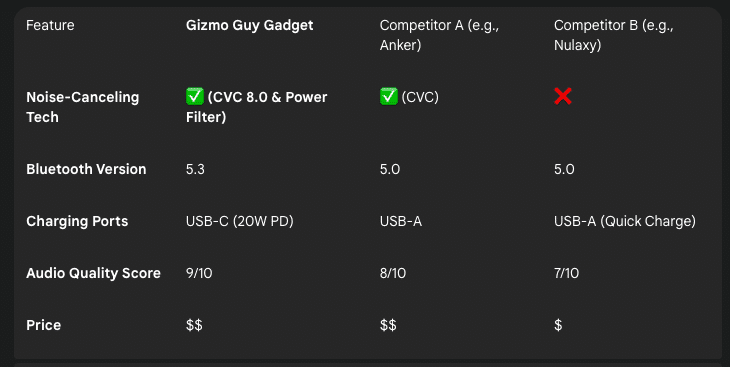
Of course. Based on the comparison table provided and general market knowledge of these brands, here is a detailed breakdown of each brand profile, along with the pros and cons of their respective FM transmitters.
This analysis would be a perfect addition to your webpage to help customers understand the competitive landscape and make an informed decision.
Gizmo Guy Gadget
About the Brand:
“Gizmo Guy Gadget” positions itself as a specialist brand focused on providing the latest, cutting-edge technology for tech enthusiasts. Rather than competing across a wide range of products, they focus on creating premium, problem-solving devices that address common user frustrations, such as audio noise and slow charging.
| Pros | Cons |
| ✅ Most Advanced Noise Cancellation: The combination of CVC 8.0 for call clarity and a dedicated Power Filter is a significant advantage, specifically designed to eliminate both call noise and electrical static/whine from the car’s alternator. | ● Higher Price Point: Sits in a higher price bracket compared to budget-focused alternatives like Nulaxy. |
| ✅ Latest Bluetooth 5.3: Offers the most stable, efficient, and future-proof connection, ensuring minimal dropouts and potentially better audio fidelity. | |
| ✅ Modern, Fast Charging: Features USB-C with 20W Power Delivery (PD), the modern standard for fast-charging the latest iPhones and Android devices. | |
| ✅ Highest Audio Quality Score: The 9/10 score reflects a focus on superior audio components and signal processing. |
Anker
About the Brand:
Anker is a well-established and highly trusted global leader in mobile accessories. Known for their reliability, excellent customer support, and high-quality construction, they are often considered a safe and dependable choice. Their “Roav” sub-brand was specifically dedicated to smart car accessories.
| Pros | Cons |
| ✅ Strong Brand Reputation: Anker is a widely recognized and trusted name, which provides peace of mind regarding quality and customer service. | ● Dated Charging Technology: Relies on the older USB-A standard, which will not fast-charge many modern devices as effectively as USB-C PD. |
| ✅ Effective Call Noise Cancellation: Includes CVC technology, which is effective for reducing background noise during phone calls. | ● Lacks Power Filtering: While good for calls, it may not be as effective at eliminating static and alternator whine compared to a device with a dedicated power filter. |
| ✅ Good Audio Quality: An 8/10 score indicates a solid, reliable audio experience that will satisfy most users. | ● Older Bluetooth Version: Uses Bluetooth 5.0, which is very stable but not the latest standard available. |
Nulaxy
About the Brand:
Nulaxy is a popular and dominant brand in the budget-friendly electronics space, especially on platforms like Amazon. They specialize in offering feature-rich products at a very competitive price point, making them a go-to choice for value-conscious consumers.
| Pros | Cons |
✅ Most Budget-Friendly: The primary advantage is its low price ($), offering an accessible entry point for users. | ❌ No Noise-Canceling Tech: The complete lack of any CVC or other noise-canceling technology is a major drawback, meaning calls and music are more susceptible to background noise and static. |
| ✅ Fast Charging for Older Devices: While it uses the older USB-A port, the inclusion of Quick Charge provides faster charging speeds for compatible Android devices. | ● Older Bluetooth Version: Uses the standard Bluetooth 5.0, lacking the enhancements of newer versions. |
| ✅ Good Value Proposition: For its price, a 7/10 audio score is respectable, making it a good value for users where budget is the main priority. | ● Lower Audio Quality: Has the lowest audio score of the three, indicating a potential for less clarity and more interference. |
The Best FM Transmitter Verdict:
After comparing the technology, features, and real-world performance, the Gizmo Guy Gadget Bluetooth Adapter stands out as the clear winner for users seeking a truly noise-free audio experience. Its unique combination of CVC 8.0 for clear calls and a dedicated power filter to eliminate static and alternator whine provides a level of clarity that budget models can’t match. Ready to ditch the static for good?
Best FM Transmitter FAQ:
How do I get rid of alternator whine on my FM transmitter?
That whining sound, which rises and falls with your engine’s speed, is electrical interference from your car’s alternator. Here are the most effective ways to fix it, starting with the easiest.
- Install a Ground Loop Isolator. If you connect your phone or audio device to the transmitter with a 3.5mm AUX cable, this is the most common and effective solution. It’s an inexpensive adapter that plugs in-line with your cable to filter out the noise.
- Upgrade Your FM Transmitter. Very cheap transmitters often have poor internal power filtering. A higher-quality model from a reputable brand is better equipped to reject noise from your car’s 12V socket.
- Try a Different USB Charging Cable. If you are charging your phone from the transmitter while playing audio via Bluetooth, sometimes a poorly shielded charging cable can introduce noise. Try a high-quality, well-shielded cable.
- Use an External Battery or Power Bank. For persistent noise, an inline noise filter can be wired to the car’s 12V socket. It cleans the “dirty power” from the alternator before it reaches your transmitter. This is a more advanced solution that may require installation help.
Do more expensive FM transmitters have better sound quality?
Yes! While you don’t need to spend a fortune a fm transmitter. The bests fm transmitter provides noticeably better sound quality than a cheap eBay or Amazon fm transmitters. The price difference usually comes down to the quality of the internal components. The Bluetooth 5.0 or higher provides a faster, more stable connection to your phone. This reduces dropouts and maintains a more consistent audio stream. A higher-quality transmitter can broadcast a more powerful and stable FM signal, which reduces dropouts and maintains a more consistent audio stream.
Does turning up the phone volume or car volume make a difference?
Yes, it makes a huge difference. Getting the volume levels right is key to minimizing static and maximizing clarity. For the best audio quality, you want to send the strongest, cleanest signal from your phone to the car stereo.
The Golden Rule: Keep your phone’s volume high and your car stereo’s volume low.
Here’s the simple-to-follow best practice:
- Turn your phone’s media volume up to about 80-90%. Avoid 100% only if you hear distortion or “crackling” in the audio, in which case back it off one or two clicks.
- Set your car stereo’s volume to a moderate starting point (e.g., 10 or 15).
- Use your car’s volume knob as the main control for your listening level.
Why this works: This method sends a strong “signal-to-noise ratio” to your car’s stereo. Your stereo receives a powerful music signal and very little background static. If you do the opposite (low phone volume, high car volume), your car’s amplifier has to boost everything, including the static, which results in thin, hissy audio.